How to Find the Best Open Educational Resources for Your Subject Area:
Finding good learning materials can be difficult. Textbooks can be expensive, some resources become outdated, and not every material matches the needs of a particular course or group of learners. Teachers may also spend a lot of time searching for materials that fit their lessons, while students may struggle to find reliable resources for independent study.
Open Educational Resources, commonly called OER, provide another option. OER are teaching, learning, and research materials that are openly available and can often be used, adapted, and shared under an open license. They include textbooks, lecture notes, videos, course materials, assignments, quizzes, simulations, and other educational content.
However, finding an OER is only the first step. The real challenge is finding a resource that is accurate, relevant, accessible, properly licensed, and suitable for a particular subject or learning goal.
This guide explains how to search for OER, evaluate their quality, check their licenses, match them with your curriculum, and adapt them for your needs.
What Are Open Educational Resources?
Open Educational Resources are educational materials that are available under an open license or in the public domain. The license determines what users are allowed to do with the material.
OER can take many forms, including:
- Open textbooks: Complete textbooks that can be read online or downloaded without the usual purchase cost.
- Lecture materials: Slides, notes, presentations, and teaching guides.
- Courses: Complete or partial course materials that may include readings, assignments, lectures, and assessments.
- Videos and podcasts: Multimedia resources that explain concepts or provide additional learning opportunities.
- Interactive resources: Simulations, activities, exercises, and educational tools.
- Assessment materials: Quizzes, question banks, assignments, and other assessment resources.
- Lesson plans: Teaching plans and classroom activities that educators can adapt.
- Research and reference materials: Openly available scholarly and educational materials that support teaching and learning.
The important point is that “free” and “open” do not always mean the same thing. A resource may be available at no cost but still have copyright restrictions. A true OER should have an open license or public domain status that clearly explains how the material can be used.
Why Use OER?
There are several reasons why educators and students may choose OER.
1. Lower Educational Costs: One of the most obvious advantages is cost. Open textbooks and other materials can reduce the amount students need to spend on learning resources.
For educators, OER can also make it easier to provide students with required materials without asking them to purchase expensive textbooks.
2. Greater Flexibility: Traditional textbooks are usually published as fixed products. OER can often be adapted to meet specific teaching or learning needs.
For example, an instructor might combine sections from different open textbooks, add local examples, remove unnecessary material, or create additional exercises.
3. Easier Access: Students can often access OER online using a computer, tablet, or smartphone. Some resources can also be downloaded for offline use.
This can be particularly useful for learners who have limited access to physical libraries or expensive textbooks.
4. Opportunities for Customization: An educator may find a good resource that covers most of a course but does not fully match the syllabus. An open license may allow the educator to modify the material rather than starting from the beginning.
5. Support for Collaboration: OER can encourage educators to share teaching materials, improve existing resources, and collaborate with colleagues.
Instead of creating every resource from scratch, educators can build on existing work.
6. Support for Different Learning Needs: OER can include different formats such as text, audio, video, images, and interactive activities. Using several formats can give learners more ways to engage with a topic.
However, accessibility should always be checked rather than assumed.
How to Find the Best OER for Your Subject Area:
Finding useful OER requires more than entering a subject into a search box. A systematic approach can save time and help you find resources that actually meet your needs.
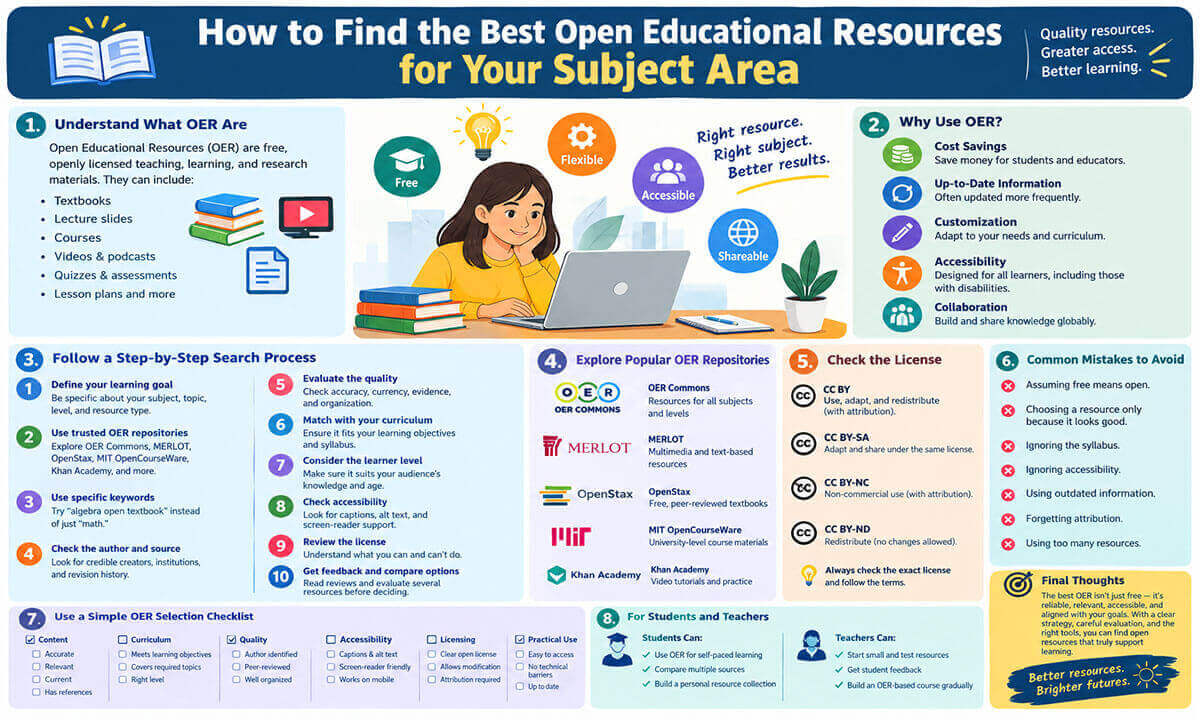
1. Start by Defining Your Learning Goal: Before searching for OER, identify exactly what you need.
For example, instead of searching for: “Psychology OER”
You could search for: “Introduction to psychology open textbook”
or:
“Cognitive psychology open educational resources”
A more specific search usually produces more useful results.
Ask yourself:
- What subject am I teaching or studying?
- What topic do I need?
- What level is the material for?
- What learning outcomes should it support?
- Do I need a textbook, video, activity, assessment, or complete course?
- Do I need material that can be modified?
- Does the resource need to be available in a particular language?
These questions give your search a clear direction.
2. Search Established OER Repositories: Established repositories are useful starting points because they organize educational materials by subject, level, format, or other categories.
Some well-known sources include:
- OER Commons: OER Commons provides a large collection of openly licensed teaching and learning materials. Resources cover many subjects and educational levels.
It can be useful when you are looking for lesson plans, activities, textbooks, and other teaching materials.
- MERLOT: MERLOT, or Multimedia Educational Resource for Learning and Online Teaching, provides access to a large collection of learning materials and multimedia resources.
It can be especially useful when searching for online learning activities and supplementary materials.
- OpenStax: OpenStax is widely known for openly licensed textbooks. Its collection includes subjects such as mathematics, science, business, social sciences, and other areas.
For educators who need a complete textbook, an open textbook provider can be a useful place to begin.
- MIT OpenCourseWare: MIT OpenCourseWare provides course materials from Massachusetts Institute of Technology courses. Materials can include lecture notes, assignments, examinations, and other course content.
It can be particularly useful for students and educators looking for university level material.
- Khan Academy: Khan Academy provides free educational content across many subjects. It is not a traditional OER repository in the same sense as some open textbook platforms, so users should check the specific terms of use and licensing before adapting or redistributing its materials.
This distinction is important. A free resource is not automatically an OER.
3. Use Specific Search Terms: Broad searches often produce too many results.
Instead of searching for: “biology” try: “cell biology open textbook”
Instead of: “education” try: “educational psychology open textbook”
You can also add terms such as:
- open textbook
- OER
- open course
- Creative Commons
- openly licensed
- open lesson plan
- open lecture notes
- open educational materials
You can also search by educational level, such as: “undergraduate sociology open textbook”
This approach can reduce irrelevant results.
4. Check the Author and Source: Once you find a resource, investigate who created it.
Look for information about:
- The author
- The institution
- The publisher or repository
- The publication date
- The revision history
- Contributors or reviewers
- References and sources
A resource created or reviewed by qualified educators or subject experts may provide stronger evidence of quality than an anonymous document with no supporting information.
This does not mean that every resource from a university is automatically accurate. It simply gives you useful information for evaluating the source.
5. Evaluate the Quality of the Content: OER should be evaluated just like other educational materials.
A resource being free does not guarantee that it is accurate or suitable.
Check Accuracy: Look at the facts, explanations, examples, statistics, and references.
For subjects that change quickly, such as technology, medicine, law, economics, or computer science, check whether the information is still current.
Check Currency: Look for publication and revision dates.
An older resource may still be valuable for some subjects. Historical theory, mathematics, philosophy, and foundational concepts may remain useful for many years.
However, subjects that develop rapidly may require newer materials.
Check Evidence: Reliable educational materials should normally provide references or identify the evidence behind important claims.
This is particularly important for science, health, psychology, education, and social science.
Check Organization: A good resource should be reasonably easy to navigate.
Look for:
- Clear headings
- Logical chapters or sections
- Learning objectives
- Examples
- Activities
- References
- Summaries where appropriate
- Useful indexes or search functions
A resource can contain accurate information and still be difficult to use if it is poorly organized.
6. Check Whether the Resource Matches Your Curriculum: A resource may be excellent but still unsuitable for your course.
Compare it with your syllabus or learning objectives.
For example, suppose your course covers:
- Introduction to psychology
- Research methods
- Learning
- Memory
- Personality
- Social psychology
An OER that covers only learning and memory may be useful, but it should not be treated as a complete textbook for the entire course.
Create a simple comparison between your learning objectives and the resource.
| Learning objective | Covered? | Suitable? | Adaptation needed? |
| Understand basic concepts | Yes | Yes | No |
| Explain research methods | Partly | Yes | Add examples |
| Analyze memory theories | Yes | Yes | Minor changes |
| Apply concepts to real situations | No | No | Add activities |
This makes the selection process more systematic.
7. Consider the Level of the Learners: A resource should match the learners’ knowledge and educational level.
A university-level textbook may be too difficult for secondary school students. Likewise, introductory material may not provide enough depth for postgraduate students.
Consider:
- Age
- Educational level
- Existing knowledge
- Language ability
- Reading level
- Technical knowledge
- Learning environment
The best resource is not necessarily the most advanced resource. It is the resource that fits the learners’ needs.
8. Check Accessibility: Accessibility is an important part of selecting educational resources.
Do not assume that a resource is accessible simply because it is available online.
Check whether:
- Videos have captions
- Images have meaningful alternative text
- Documents work with screen readers
- Text has sufficient contrast
- Headings are properly structured
- Audio content has transcripts
- Interactive activities can be used with different devices
- The material works on mobile devices when needed
Accessible resources can make learning easier for a wider range of students.
9. Check the License Carefully: Licensing is one of the most important parts of using OER.
Many OER use Creative Commons licenses. However, Creative Commons licenses have different conditions.
- CC BY: This generally allows users to copy, redistribute, remix, adapt, and build upon the material, including for commercial purposes, provided appropriate credit is given.
- CC BY SA: This allows adaptation and redistribution with attribution. Adapted material generally must be shared under the same or a compatible license.
- CC BY NC: This permits adaptation and redistribution for noncommercial purposes, with attribution.
- CC BY ND: This allows redistribution with attribution but does not permit distributing modified versions of the material.
There are also other Creative Commons licenses and public domain resources.
Always check the exact license attached to the resource. Do not assume that every resource labeled “open” gives you the same permissions.
10. Learn How to Give Proper Attribution: Open licensing does not remove the need to acknowledge the original creator.
When adapting an OER, record important information such as:
- Title
- Author
- Original source
- License
- Link to the original material
- Details of any changes you made
Keeping this information from the beginning makes attribution much easier later.
11. Look at Reviews and Feedback: Reviews can provide useful information about how other educators and learners experienced a resource.
Look for comments about:
- Accuracy
- Ease of use
- Organization
- Difficulty level
- Technical problems
- Quality of activities
- Suitability for particular learners
However, reviews should not replace your own evaluation. A resource that works well for one course may not work equally well for another.
12. Compare Several Resources: Do not immediately choose the first resource you find.
Try to identify two or three possible resources and compare them.
Consider:
| Factor | Resource A | Resource B | Resource C |
| Content coverage | |||
| Accuracy | |||
| Currency | |||
| Learning level | |||
| Accessibility | |||
| License | |||
| Adaptability | |||
| Assessment materials |
This can help you make a more informed selection.
13. Adapt the Resource When the License Allows It: One major advantage of OER is the possibility of adaptation.
An educator might:
- Add local examples
- Simplify difficult explanations
- Add diagrams
- Remove unnecessary sections
- Translate selected content
- Add practice questions
- Create new activities
- Combine material from multiple OER
- Update outdated examples
However, the license must permit the type of modification you want to make.
If the license does not allow modification, you should not alter the material and distribute the modified version as though you created it.
14. Combine Different OER: You do not always need to find one perfect resource.
A better approach may be to combine several resources.
For example, a teacher might use:
- An open textbook for core concepts
- Open videos for difficult topics
- Open activities for classroom practice
- Open quizzes for assessment
- Open case studies for discussion
This creates a collection of resources that supports different parts of the learning process.
15. Use OER Communities: OER communities can make the search process easier.
Educators often share resources, teaching ideas, reviews, and adaptation experiences through professional communities and online groups.
You can learn from others by asking questions such as:
- Which OER do you use for this course?
- Does this textbook match an introductory class?
- Have you adapted this resource?
- Are there accessibility problems?
- Is there a newer version available?
Community feedback can help you discover resources that may not appear at the top of a general search.
16. Keep Track of Updates: Finding a resource is not the end of the process.
Check whether the resource has been updated since you first found it.
This matters particularly for subjects where information changes quickly.
Keep a simple record of:
- Resource title
- Author
- Source
- License
- Date accessed
- Version or revision date
- Last review date
This is useful for teachers who use the same materials across multiple semesters.
Common Mistakes to Avoid When Searching for OER:
Mistake 1: Assuming Free Means Open: A resource can be free to read but still be protected by copyright.
Always check the license.
Mistake 2: Choosing a Resource Only Because It Looks Good: A modern design does not necessarily mean the content is accurate or appropriate.
Evaluate the content as well as the appearance.
Mistake 3: Ignoring the Syllabus: A resource may contain excellent information but still fail to cover the required learning outcomes.
Always compare it with your curriculum.
Mistake 4: Ignoring Accessibility: A resource that works for one learner may create barriers for another.
Check accessibility before adopting it.
Mistake 5: Using Outdated Information: Older material is not automatically bad. However, you should be more careful when the subject changes quickly.
Check the publication and revision history.
Mistake 6: Forgetting Attribution: Openly licensed content still requires users to follow the conditions of the license.
Record attribution information when you collect resources.
Mistake 7: Using Too Many Resources: More resources do not always mean better learning.
A small collection of carefully selected materials can be easier for both teachers and students to use.
A Simple OER Selection Checklist:
Before using an OER, ask:
Content:
- Is the information accurate?
- Is the content relevant?
- Is it current enough for the subject?
- Does it provide supporting references?
Curriculum:
- Does it match the learning objectives?
- Does it cover the required topics?
- Is the level appropriate?
Quality:
- Is the author identified?
- Has the material been reviewed?
- Is the resource well organized?
Accessibility:
- Can different learners access it?
- Are videos captioned?
- Are documents screen reader friendly?
- Does it work on common devices?
Licensing:
- Is there a clear open license?
- Can I modify the material?
- Can I redistribute it?
- What attribution is required?
Practical Use:
- Is it easy to download or access?
- Can students use it without unnecessary technical barriers?
- Can I adapt it if needed?
- Is there a stable source or updated version?
How Students Can Use OER Effectively:
OER are not only useful for teachers. Students can use them for independent learning.
A student can use an open textbook to review a difficult topic, watch open educational videos to understand a concept, or use practice activities to prepare for an examination.
Students should still evaluate resources carefully.
When studying from multiple sources, compare explanations and check important information against reliable academic sources.
It can also help to create a personal collection of useful resources organized by subject and topic. This makes it easier to return to trusted materials later.
How Teachers Can Build an OER Based Course:
Teachers who want to use OER more extensively can begin gradually.
Start with one part of the course rather than replacing everything at once.
For example:
- Step 1: Identify one expensive or difficult-to-access textbook.
- Step 2: Search for an open alternative.
- Step 3: Compare the open resource with the current material.
- Step 4: Check its license and accessibility.
- Step 5: Test it with a small section of the course.
- Step 6: Collect student feedback.
- Step 7: Make appropriate changes.
- Step 8: Expand the use of OER if the results are suitable.
This approach gives teachers time to understand what works for their learners.
Final Thoughts:
Finding the best Open Educational Resources for a subject area is not simply about finding free material online. It is about finding resources that are reliable, relevant, accessible, properly licensed, and suitable for a specific group of learners.
Start by defining your learning objectives. Search established OER repositories and use specific keywords. Evaluate the author, evidence, accuracy, currency, and organization of each resource. Then check whether the material matches your curriculum and learner level.
Licensing also matters. Before copying, adapting, translating, or redistributing an OER, understand what its license allows. Give proper attribution and keep track of the original source.
Most significantly, do not feel that you have to find one resource that does everything. A well-chosen combination of open textbooks, videos, activities, assessments, and other materials can create a useful learning environment.
OER can make education more accessible and flexible, but their value depends on how carefully they are selected and used. With a clear search strategy and a careful evaluation process, educators and students can find open resources that genuinely support learning.

is an experienced educator and academic currently serving as a Lecturer at Nurul Amin Degree College. With a career dedicated to student development and institutional excellence, he brings a wealth of classroom expertise and pedagogical knowledge to his current role. Before joining the faculty, he served as an Assistant Teacher at Zinzira PM Pilot School and College.